One Paragraph. Five Jobs Done. Nothing Sent Without You.

It's noon.
The schedule survived the morning. Now it's the office's turn.
A new commercial client signed this morning. They need a client record, a site, a contract, recurring visits every other Saturday, and someone with the right ticket assigned to them.
A supplier quote just came in and needs to become purchase orders.
Two invoices are overdue. Someone wants to know which jobs are losing money this month.
Your office manager has five screens open and a sandwich she hasn't touched.
Software made the work possible. It didn't make it fast.
Setting up one recurring customer shouldn't take twenty minutes. But it does, because it's five different screens: client, then site, then contract, then shifts, then assignment. Each one waits on the last.
Most "AI assistants" in field-service software don't help with that. They answer questions. They draft a message. Then they hand the actual work back to you.
We wanted something different. An assistant that does the work, and still never acts without your say.
That's the AI Workbench.
Tell it what you need. It builds the whole thing.
Type what you'd say to a sharp office manager:
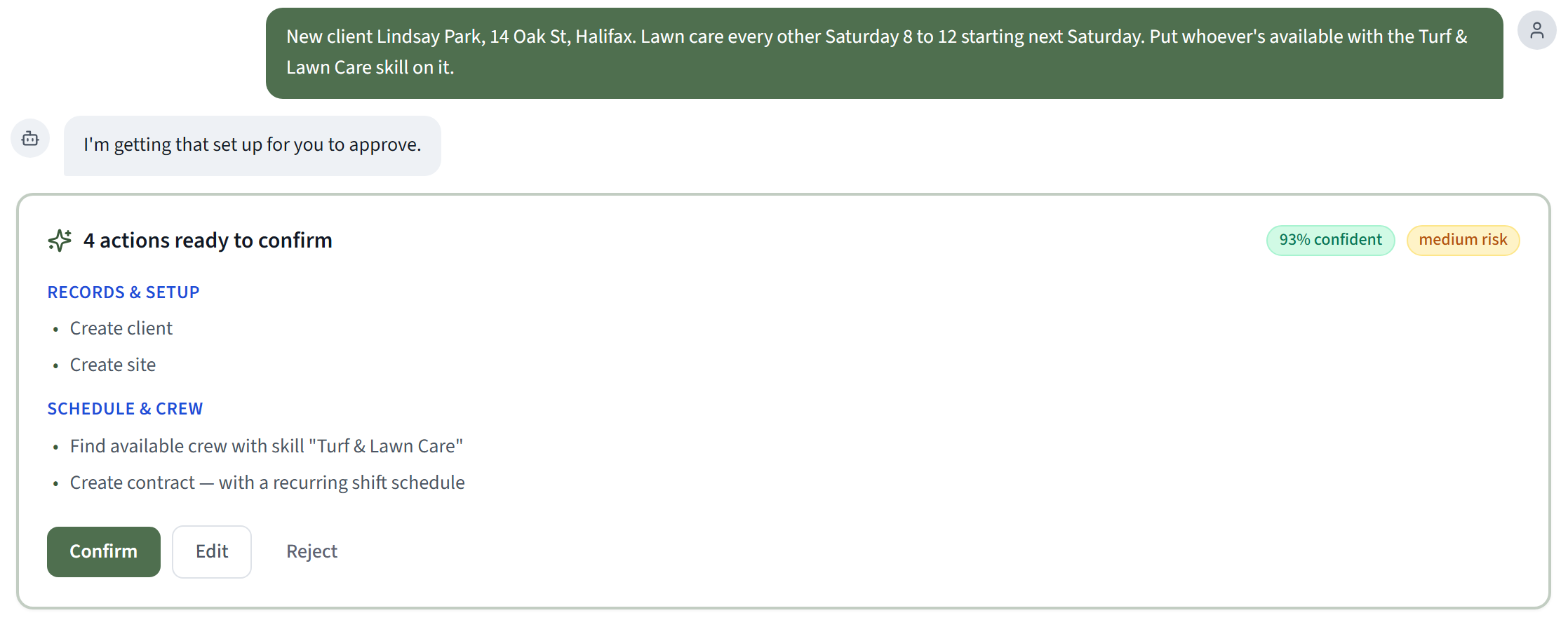
"New client Lindsay Park, 14 Oak St, Halifax. Lawn care every other Saturday 8 to 12 starting next Saturday. Put whoever's available with the Turf & Lawn Care skill on it."
The Workbench turns that into a single card with every step laid out: the client, the site, the contract, the recurring shifts, and the crew member it found who's available and qualified.
Where one step needs the result of another, like the new client's record, it links them for you.
You read it. You press Confirm. It's done.
One paragraph. Five jobs. One click.
It does the work across your whole business
This isn't a chatbot bolted onto one corner of the app. The Workbench can act across CrewOS:
| Area | What you can ask it to do |
|---|---|
| Quotes and invoices | Build them, send them, and see which ones are overdue |
| Purchasing | Turn a supplier quote into purchase orders for every supplier in one step |
| Construction billing | Pay applications, change orders, lien waivers and T&M tickets |
| Crews and scheduling | Find who's free with the right skill and book them |
| Compliance | Create skills and certification types and track who holds them |
| Costs | Expenses, catalogs and rate sheets |
| Team and settings | Invites, roles, automations and branding |
That's over 200 actions it can take for you.
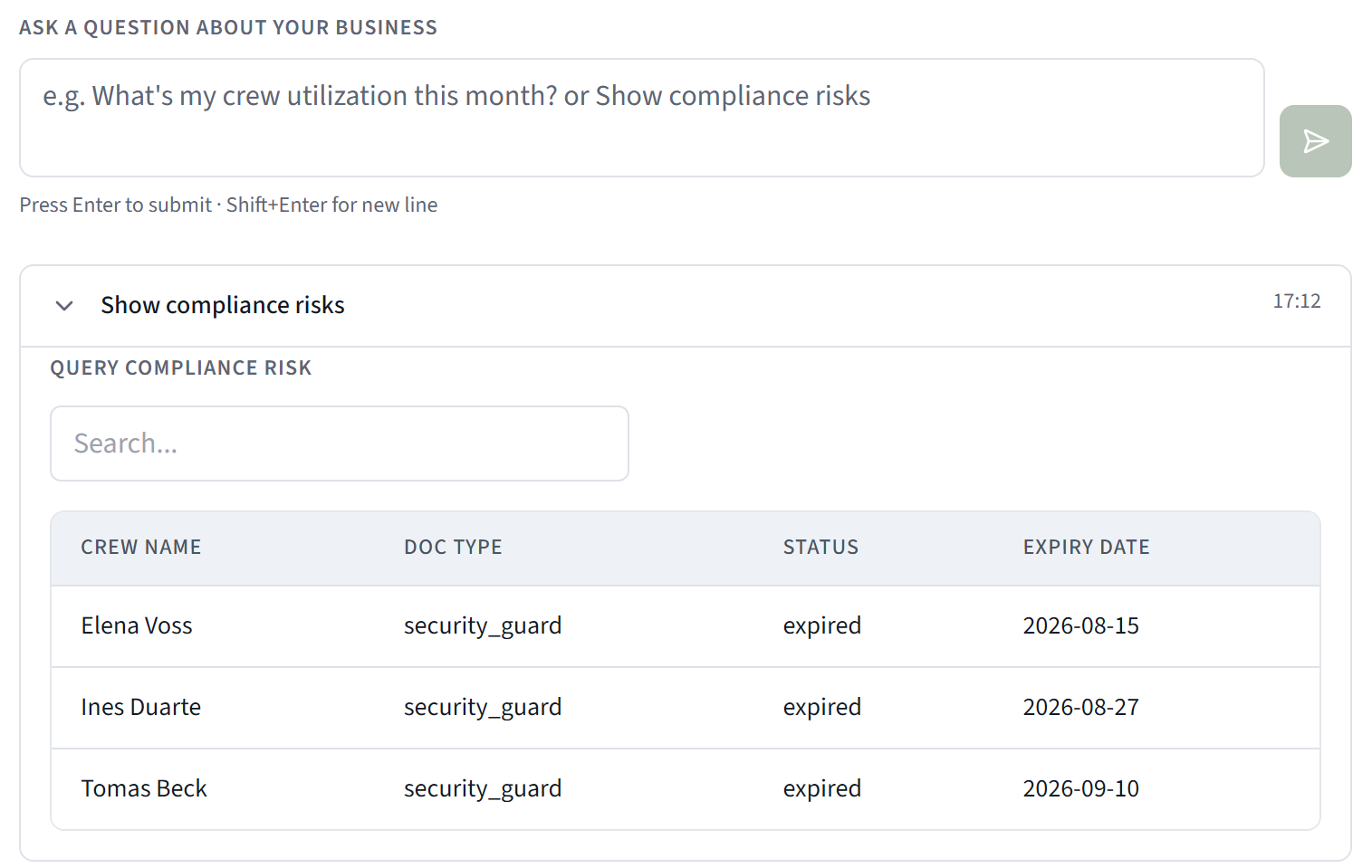
And it answers the questions owners actually ask, from your live numbers: what's overdue, which jobs are underwater, where you're over or under billed on work in progress, what cash is coming in, what labor is costing you, and which contracts are about to expire.
You approve it before it happens
Here's the rule the whole Workbench is built on:
Nothing changes in your business until you press Confirm.
The AI proposes. You review. You can Confirm, Edit or Reject any step.
Riskier actions go one step further. They route to Approvals and need a second sign-off from the right person. And the risk level comes from CrewOS, not from the AI. The model can't decide on its own that something is low risk.
If a step is waiting on approval, the rest of the chain doesn't fail. It waits. The chat tells you it'll finish the remaining steps once the approval clears, and it does.
It doesn't make things up
The fastest way to lose a client is to send the invoice to the wrong person.
So the Workbench has firm rules about where information comes from:
- Quotes and invoices go to the billing email already on the client record. Not an address the AI guessed.
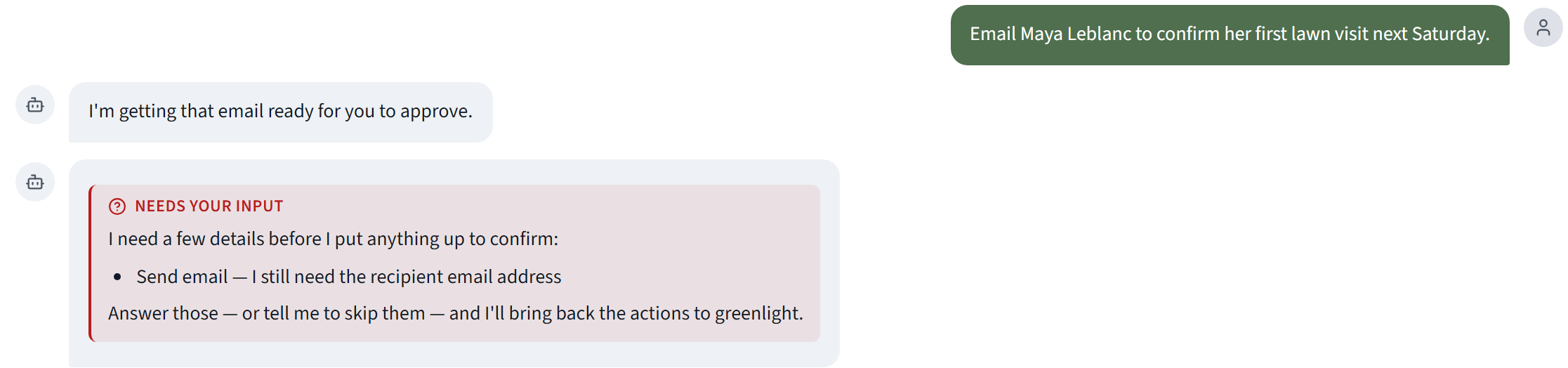
- It won't invent contact details. If you ask it to email someone and it doesn't have their address, it asks you. It won't show you a confirm button until it has what it needs.
- It won't guess between similar names. If "Lindsay" matches three clients, it asks which one.
- It tells you what it couldn't do. Anything it can't handle is listed plainly, so nothing gets skipped quietly.
It tells you what actually happened
After you confirm, the Workbench reports real outcomes, sorted so you can scan them: Done, Queued, Held for review, Waiting on your approval, Couldn't complete.
No blanket "all done!" when three things are still waiting.

And you can undo it
Changed your mind? Most actions have an Undo button for 24 hours.
Every action the Workbench takes is also written to CrewOS's tamper-evident audit log, where each entry is chained to the one before it. You can always see who asked for what, who approved it, and what happened.
Back to noon
- The new client is set up, with visits booked every other Saturday and a qualified crew member on them.
- The supplier quote is purchase orders.
- The overdue invoices have been resent, to the right addresses.
- The answer on which jobs are losing money is sitting in the chat as a table.
Your office manager confirmed four cards and ate her sandwich.
That's the point. Not an AI that runs your business behind your back. An AI that does the work, and still waits for your say.
Next in the series: it's evening, and a text is about to go out to a client at 11 PM. The Text That Went Out at 11 PM